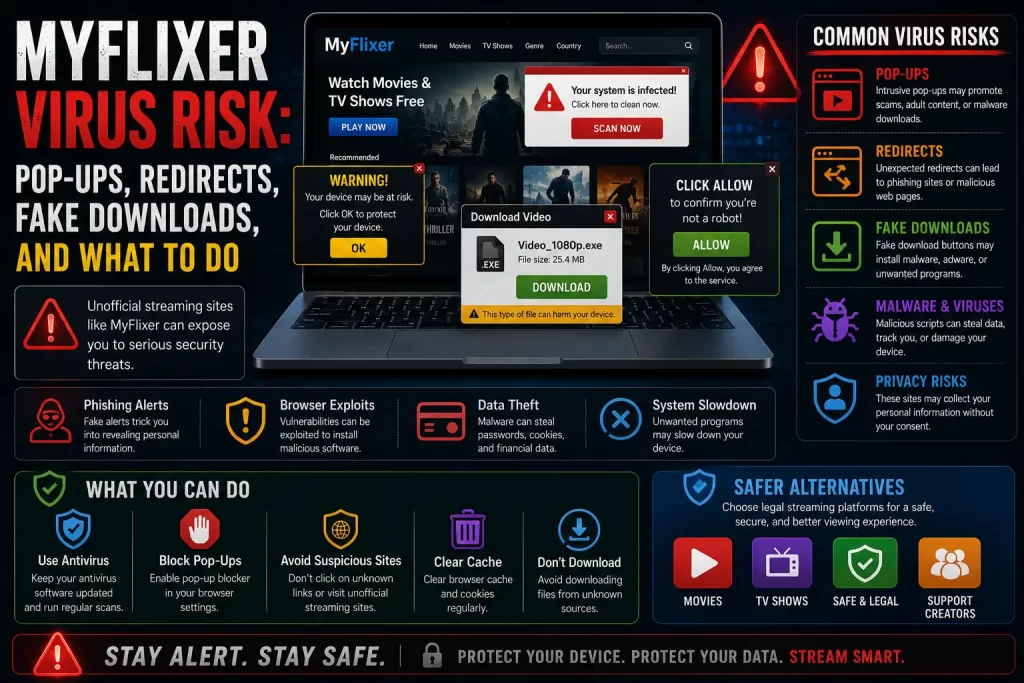

Many users search for “MyFlixer virus” after seeing pop-ups, fake play buttons, strange redirects, browser notifications, suspicious downloads, or security warnings connected to a MyFlixer-related page.
The safest answer is simple: MyFlixer-style sites can expose users to malware and scam risks, especially through clone pages, ads, fake downloads, APK files, and browser notification prompts.
This guide explains what the MyFlixer virus risk really means, what warning signs to look for, and what steps users can take if they already clicked something suspicious.
Important note: This article is for educational purposes only. It does not provide MyFlixer mirror links, proxy links, working domains, bypass steps, APK downloads, or instructions for accessing unauthorized streaming services.
Quick Answer: Can MyFlixer Cause a Virus?
MyFlixer-style sites can expose users to virus and malware risks, especially through pop-ups, fake play buttons, redirects, fake downloads, third-party APKs, and suspicious ads.
Malwarebytes has a threat alert for a MyFlixer-related domain. It says the domain was associated with riskware and abused to spread scams, phishing, potentially unwanted programs, and malware. You can read the Malwarebytes warning here: Malwarebytes: myflixer.to threat alert.
The U.S. Federal Trade Commission also warns that illegal streaming apps and websites can expose users to malware that may steal personal and financial information. You can read the FTC warning here: Malware from illegal video streaming apps.
If you clicked something suspicious, close the page, do not install anything, remove unknown browser permissions, scan your device, and change any reused passwords.
Related guide: Is MyFlixer Safe? Malware, Fake Sites, Ads, and Privacy Risks Explained
What Users Mean by “MyFlixer Virus”
When users say “MyFlixer virus,” they may mean different things. It does not always mean a confirmed virus is already installed. It may mean the user saw suspicious behavior after visiting a MyFlixer-related page.
Common examples include:
- Pop-ups opening again and again
- Redirects to strange websites
- Fake play buttons
- Fake download buttons
- Browser notifications from unknown sites
- Messages claiming the device is infected
- APK download prompts
- Browser extensions appearing unexpectedly
- Device slowdown after visiting a site
- Antivirus or browser warnings
These signs should be taken seriously. Even when there is no confirmed infection, they can point to unsafe pages or unwanted browser permissions.
Malwarebytes Warning About MyFlixer
Malwarebytes says the MyFlixer-related domain it lists is a free streaming website and that the service was abused to spread scams, phishing, potentially unwanted programs, and malware.
This matters because MyFlixer is not only a streaming-safety topic. It is also a device-safety and privacy topic.
A warning from a security vendor does not mean every page using the MyFlixer name is identical. But it does show why users should be careful with MyFlixer-related sites, especially clone pages and download prompts.
Common Virus and Malware Risks
MyFlixer-related virus risks usually come from the things around the stream, not from a normal legal video player.
Common risk sources include:
- Fake play buttons
- Fake “download movie” buttons
- Fake video-player updates
- Fake browser updates
- Fake antivirus alerts
- Pop-up ads
- Redirect chains
- Unknown APK files
- Browser extension prompts
- Notification permission prompts
- Fake support pages
- Fake payment pages
A trusted legal streaming platform should not ask users to install a random player, allow notifications, or download an APK just to watch a movie.
MyFlixer Pop-Ups and Redirects
Pop-ups and redirects are common warning signs on unsafe streaming pages. One click may open several tabs, send the user to another website, or show a fake warning message.
These redirects may lead to:
- Fake virus pages
- Fake prize pages
- Adult or gambling pages
- Suspicious app downloads
- Browser extension pages
- Fake customer support pages
- Payment verification pages
- Other clone streaming sites
Do not click through these pages. Close the tab and avoid returning to the site.
Fake Downloads and Fake Updates
Fake download buttons are one of the most common risks on unsafe streaming pages.
A fake download may claim to be:
- A movie file
- A video player
- A browser update
- A codec update
- An app update
- An antivirus tool
- A streaming extension
- A “required” verification file
Do not install anything from a MyFlixer-related page. If a page says you need a special player or update to keep watching, leave the page.
Browser Notification Spam
Some unsafe streaming pages ask users to click “Allow” on a browser notification prompt. This can lead to spam notifications even after the page is closed.
Notification spam may include:
- Fake virus alerts
- Fake software updates
- Adult ads
- Gambling ads
- Crypto scams
- Fake prize messages
- Links to suspicious downloads
If you allowed notifications from a suspicious site, remove that permission in your browser settings.
MyFlixer APK Virus Risk
MyFlixer APK downloads from third-party websites are risky. An APK can include unwanted or harmful behavior, especially when it comes from an unknown source.
APK risks include:
- Malware hidden inside the app
- Adware and pop-ups
- Spyware or tracking
- Fake streaming functions
- Apps that redirect to unsafe pages
- Apps that request too many permissions
- Apps that are hard to remove
Do not download MyFlixer APK files from third-party sites. Use official apps from legal streaming services instead.
Related guide: Is There a MyFlixer App? App-Store Listings, APK Risks, and Safer Options
Phishing and Password Theft
Some fake streaming pages are designed to steal information. This is called phishing.
CISA says phishing often tries to get users to open a harmful link or share personal information. You can read CISA’s guidance here: Recognize and Report Phishing.
On MyFlixer-related pages, phishing may appear as:
- Fake login pages
- Fake account verification
- Fake support chat
- Fake refund forms
- Fake VIP pages
- Fake password reset pages
Never reuse important passwords on unclear streaming sites. If you already did, change those passwords immediately.
Signs Your Device May Be Affected
Watch for these signs after visiting a suspicious MyFlixer-related page:
- Your browser opens random tabs
- You see notifications from unknown sites
- Your homepage or search engine changed
- You see new browser extensions
- Your device feels slower than usual
- You see fake virus warnings
- You notice apps you did not install
- You receive strange login alerts
- You see unknown charges after entering payment details
One sign does not always prove malware, but it is enough to check your browser, device, and accounts.
What to Do Right Now
If you think you clicked something unsafe, follow these simple steps.
- Close the suspicious page. Do not keep clicking pop-ups or buttons.
- Do not download anything. Cancel any file, APK, extension, or update prompt.
- Remove browser notifications. Block unknown sites from sending notifications.
- Check browser extensions. Remove anything unfamiliar.
- Run a malware scan. Use a trusted security tool.
- Restart your browser and device. This can stop some unwanted behavior.
- Change reused passwords. Start with email, banking, social, and work accounts.
- Monitor payment accounts. Contact your bank if you entered card details.
Do not respond to fake support pages or messages claiming they can “clean” your device for a fee.
Browser Cleanup Checklist
Use this checklist if the issue appears in your browser.
- Clear unknown notification permissions
- Remove suspicious extensions
- Clear browsing data for suspicious sites
- Check your homepage setting
- Check your default search engine
- Update your browser
- Turn on browser safe-browsing protection
- Run a trusted security scan
These steps help remove common browser-based problems such as notification spam, unwanted extensions, and hijacked settings.
Phone Cleanup Checklist
Use this checklist if you installed an app or APK on your phone.
- Uninstall the suspicious app
- Remove unknown APK files from downloads
- Review app permissions
- Revoke access to files, contacts, camera, microphone, and location if not needed
- Check for apps you do not remember installing
- Update your phone software
- Run a trusted mobile security scan
- Change reused passwords
On Android, be especially careful if you enabled “install unknown apps.” Turn that setting off when you no longer need it.
What If You Entered Payment Details?
If you entered card details or payment information on a MyFlixer-related page, take it seriously.
- Check your bank or card statement.
- Look for unknown or recurring charges.
- Contact your bank or card provider if anything looks suspicious.
- Ask about blocking the card or disputing charges if needed.
- Save screenshots, emails, receipts, and transaction details.
Do not enter payment details again on the same page to “verify” or “cancel.” Fake verification pages can be part of the scam.
What If You Entered a Password?
If you entered a password on a MyFlixer-related page, change it anywhere else it was used.
Start with important accounts:
- Banking
- Payment apps
- Social media
- Work accounts
- Cloud storage
Use a unique password for every important account and turn on two-factor authentication where possible.
How to Avoid This Next Time
To reduce future risk, avoid unsafe streaming pages and downloads.
- Do not use MyFlixer mirrors or proxy pages
- Do not download APK files from unknown sites
- Do not install browser extensions from streaming pages
- Do not allow notifications from unknown sites
- Do not enter payment details for “free verification”
- Do not reuse passwords on streaming sites
- Do not ignore browser or antivirus warnings
- Use legal streaming platforms instead
Related guide: MyFlixer Clone Sites: How to Spot Fake Streaming Websites
Safer Legal Alternatives
The safest way to avoid MyFlixer virus risk is to use legal streaming services and legal discovery tools.
Good options include:
- Paid streaming services such as Netflix, Prime Video, Disney+, Apple TV, Hulu, Max, Paramount+, Peacock, and regional services
- Free legal ad-supported services such as Tubi, Pluto TV, Plex, and broadcaster-owned services where available
- Digital rental and purchase platforms such as YouTube Movies, Google TV, Apple TV, and Prime Video rentals
- Official broadcaster apps
- Library-linked streaming services where available
- Legal discovery tools such as JustWatch
JustWatch helps users find where movies and TV shows are legally available across streaming services. You can visit it here: JustWatch.
Related guide: Best Legal MyFlixer Alternatives for Movies and TV Shows
Final Verdict
MyFlixer virus risk is real enough to take seriously. The biggest dangers come from pop-ups, redirects, fake downloads, fake updates, browser notification prompts, phishing pages, and third-party APKs.
If you already clicked something suspicious, clean up your browser, remove unknown apps or extensions, run a malware scan, change reused passwords, and monitor payment accounts if needed.
The safest long-term choice is to avoid MyFlixer-style sites and use legal streaming platforms instead.
FAQs About MyFlixer Virus Risk
Can MyFlixer give you a virus?
MyFlixer-style sites can expose users to malware risk through pop-ups, redirects, fake play buttons, fake downloads, APK files, and suspicious ads.
Why did my antivirus block MyFlixer?
Security tools may block MyFlixer-related pages because of riskware, phishing, scams, potentially unwanted programs, malware, or unsafe ads.
Are MyFlixer pop-ups dangerous?
They can be. Pop-ups may lead to fake virus pages, suspicious downloads, phishing forms, notification spam, or scam pages.
Is MyFlixer APK safe?
No. Users should avoid MyFlixer APK downloads from third-party websites because unknown APK files can expose devices to malware, adware, spyware, and privacy risks.
What should I do if I allowed notifications?
Go to your browser notification settings and remove permission for any unknown or suspicious site.
What should I do if I downloaded something?
Do not open the file. Delete it, empty your downloads folder if needed, and run a trusted malware scan.
What should I do if I installed a MyFlixer APK?
Uninstall it, remove the APK file, review app permissions, run a mobile security scan, and change any reused passwords.
What should I do if I entered my card details?
Check your statement and contact your bank or card provider if you see suspicious or recurring charges.
What should I use instead of MyFlixer?
Use legal streaming platforms, free legal ad-supported services, official broadcaster apps, rental platforms, or legal discovery tools such as JustWatch.
Sources and Further Reading
Disclaimer
This article is for general educational and informational purposes only. It does not provide legal advice, cybersecurity advice, financial advice, medical advice, malware removal guarantees, APK downloads, or instructions for accessing unauthorized streaming services. Users should rely on trusted security tools, official app stores, banks, cybersecurity professionals, licensed streaming platforms, and legal sources whenever possible.