
MyFlixer is often searched by people who want to watch movies or TV shows online for free. But before clicking any MyFlixer-related page, app listing, or APK download, there is one important question to ask: is MyFlixer safe?
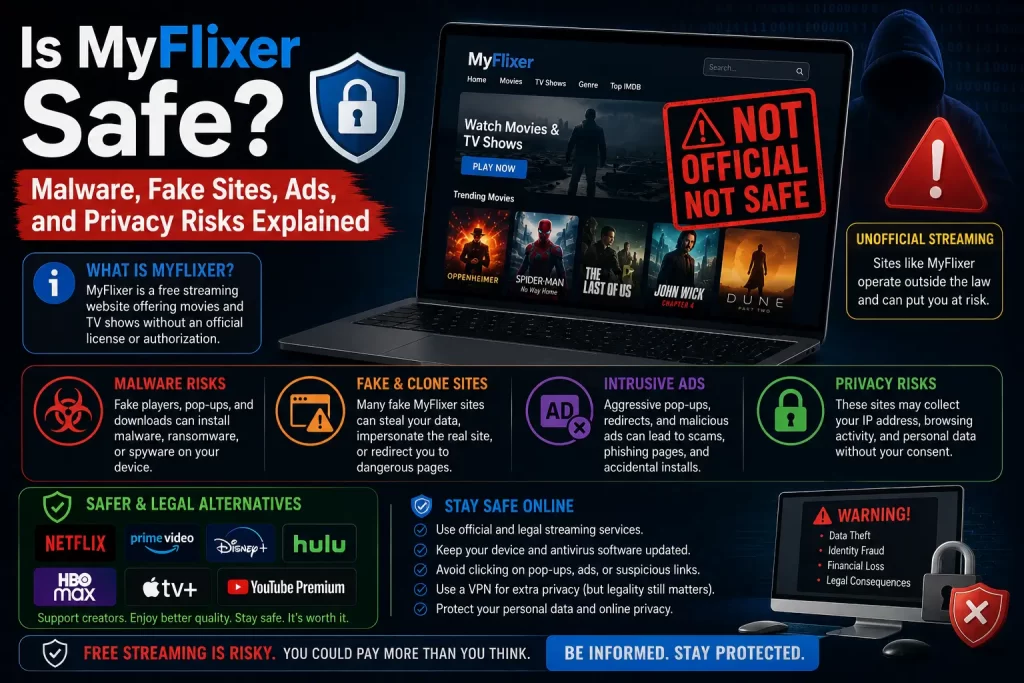
The safest answer is no. MyFlixer should be treated as risky. The risk is not only about one website. It is about the wider MyFlixer ecosystem, which may include fake sites, clone pages, pop-ups, redirects, suspicious ads, app-store confusion, APK downloads, phishing pages, and privacy risks.
This guide explains the main safety risks in simple terms, including malware warnings, fake MyFlixer pages, app and APK risks, pop-ups, privacy tracking, payment scams, and safer legal alternatives.
Important note: This article is for educational purposes only. It does not provide MyFlixer mirror links, proxy links, working domains, bypass steps, APK downloads, or access instructions for unauthorized streaming services.
Quick Answer: Is MyFlixer Safe?
No. MyFlixer should not be considered a safe or risk-free streaming option.
Security vendor Malwarebytes has a threat alert for a MyFlixer-related domain. The page says the domain was associated with riskware and that it was abused to spread scams, phishing, potentially unwanted programs, and malware. You can read the Malwarebytes detection page here: Malwarebytes: myflixer.to detection.
The U.S. Federal Trade Commission also warns that illegal video streaming apps and websites can expose users to malware. According to the FTC, this malware may steal credit card information, login credentials, banking credentials, photos, and other personal information. You can read the FTC guidance here: Malware from illegal video streaming apps.
For users, the safest choice is to avoid MyFlixer-style sites, fake apps, APK downloads, clone pages, and pop-up-heavy streaming pages. Use legal streaming platforms or legal discovery tools instead.
Related guide: What Is MyFlixer? Safety, Legality, Risks, and Legal Alternatives Explained
Why MyFlixer Should Be Treated as Risky
MyFlixer is risky because users may not know which site, app, or page they are actually using. The MyFlixer name can appear across different websites, lookalike pages, app listings, APK pages, and clone sites.
A user may think they are opening a simple streaming page, but they may actually be on a fake site that exists to show ads, collect information, push downloads, or redirect traffic.
The main risks include:
- Malware and riskware
- Fake MyFlixer sites
- Pop-ups and redirects
- Fake play buttons
- Unsafe APK downloads
- Confusing app-store listings
- Browser notification spam
- Phishing pages
- Password theft
- Payment scams
- Privacy tracking
- Copyright risk
A legal streaming platform usually has clear ownership, official apps, support pages, billing systems, privacy policies, and licensed content. MyFlixer-style sites often do not show the same level of trust.
MyFlixer Malware and Riskware Warnings
One of the clearest safety concerns is malware risk.
Malwarebytes says a MyFlixer-related domain was associated with riskware and was abused to spread scams, phishing, potentially unwanted programs, and malware. This does not mean every page using the MyFlixer name behaves the same way, but it is a strong warning sign for users.
Malware risk can appear through:
- Fake video players
- Fake play buttons
- Fake download buttons
- Fake browser updates
- Fake video-player updates
- Pop-up ads
- Redirect chains
- Unsafe APK downloads
- Browser extension prompts
- Fake security warnings
- Notification permission prompts
Many users assume that streaming is safe as long as they do not download anything. That is not always true. Unsafe streaming pages may push accidental downloads, browser permissions, fake verification steps, or malicious redirects.
Related guide: MyFlixer Virus Risk: Pop-Ups, Redirects, Fake Downloads, and What to Do
Fake MyFlixer Sites and Clone Pages
Fake MyFlixer sites are another major concern. A clone site may use the MyFlixer name, similar design, or wording like “official,” “new,” “working,” or “updated.” That does not prove the site is safe or real.
Clone pages may be created to:
- Capture users searching for MyFlixer
- Show aggressive ads
- Redirect users to unrelated websites
- Push APK downloads
- Collect email addresses
- Steal passwords
- Sell fake premium access
- Collect payment details
- Trick users into allowing notifications
MyFlixer has also appeared in wider piracy reporting. The Guardian reported in 2024 that FMovies and affiliated sites, including MyFlixer, were shut down after action involving ACE and Hanoi police. This kind of reporting shows why users should be careful with any page claiming to be a new or official version.
Related guide: MyFlixer Clone Sites: How to Spot Fake Streaming Websites
Pop-Ups, Redirects, and Fake Play Buttons
Many unsafe streaming sites use pop-ups and redirects to make money or push users toward risky pages. This can happen when a user clicks a play button, closes an ad, tries to search for a title, or clicks a video thumbnail.
Common warning signs include:
- Several play buttons on one page
- New tabs opening after one click
- Redirects to unrelated sites
- Fake “download now” buttons
- Fake “continue watching” buttons
- Fake CAPTCHA pages
- Requests to allow browser notifications
- Messages saying your device needs an update
- Fake virus warnings
A trusted streaming service should not require users to click through confusing ads, install unknown tools, or allow browser notifications just to watch a video.
Is the MyFlixer App Safe?
Users may find apps using the MyFlixer name, but that does not automatically mean they are official streaming apps.
Some Google Play listings using the MyFlixer name describe themselves as movie discovery or entertainment information tools. One listing says it helps users find what to watch and explore movie details. Another says it does not stream or download movies and is for informational and entertainment purposes only.
This creates confusion. A user may search for a MyFlixer streaming app but find a discovery app, an unrelated app, or a copycat app.
Before installing any app using the MyFlixer name, check:
- Who developed the app
- What the app actually does
- Whether it streams content or only shows information
- What permissions it asks for
- What data it collects
- Whether it sends users to external pages
- Whether it asks for payment details
Use official apps from licensed streaming services whenever possible.
Related guide: Is There a MyFlixer App? App-Store Listings, APK Risks, and Safer Options
MyFlixer APK Risks
Users should avoid MyFlixer APK downloads from unknown websites.
An APK is an Android app installation file. APK files are not automatically bad, but downloading them from unknown sites can be risky. They may bypass normal app-store review and may contain unwanted or harmful behavior.
MyFlixer APK risks include:
- Malware hidden in the app
- Adware and pop-ups
- Spyware or tracking
- Fake streaming features
- Apps that redirect to unsafe sites
- Apps that request unnecessary permissions
- Apps that are difficult to remove
- Login or payment scams inside the app
Research on unwanted Android apps has found that web downloads can be a riskier distribution route for unwanted apps compared with official app-store environments. You can review the paper here: How Did That Get In My Phone?
The safest rule is simple: do not download MyFlixer APK files from third-party websites.
Privacy and Tracking Risks
Privacy is another important concern. A MyFlixer-related page may collect or expose user data through ads, scripts, cookies, redirects, forms, or app permissions.
Possible privacy risks include:
- IP address tracking
- Browser fingerprinting
- Third-party ad tracking
- Cookie tracking
- Email collection
- Device ID collection
- Watch activity tracking
- Payment-data exposure
- Unclear data deletion options
Legal streaming platforms may also collect data, but they usually provide privacy policies, account settings, support pages, and company information. Unknown streaming sites may not provide those protections.
For a wider safety overview, read our guide on pirated streaming risks.
Phishing and Password Risks
Phishing happens when a page tries to trick users into entering sensitive information. Fake MyFlixer login pages, fake verification pages, and fake support pages can be used for phishing.
Phishing pages may ask for:
- Email address
- Password
- Card details
- Phone number
- Verification codes
- Account recovery details
Password reuse makes this worse. If a user enters the same password used for email, banking, social media, or work accounts, one fake streaming login can become a much bigger problem.
Use unique passwords and never enter important account details on unclear streaming pages.
Payment and Account Risks
Some MyFlixer-style pages may ask users to create an account, verify access, pay for premium features, or enter payment details. This is risky if the page is not clearly operated by a verified legal business.
Payment and account risks include:
- Fake payment forms
- Fake account verification
- Recurring charges
- No refund process
- No visible company behind the payment
- Password theft
- Phishing emails after signup
- Fake support pages
Paying a site does not prove that it has licensed rights to stream movies or TV shows. It only adds financial risk.
Device and Browser Risks
Unsafe streaming pages can also affect your browser or device. This can happen through extensions, notification permissions, unwanted apps, or suspicious downloads.
Signs of a problem may include:
- New browser notifications from unknown sites
- Browser homepage or search changes
- Unknown extensions
- Device slowdown
- Unexpected pop-ups
- Apps you do not remember installing
- Security warnings
- Unusual account login alerts
If you notice these signs after visiting a MyFlixer-related page, remove suspicious permissions, scan your device, and change reused passwords.
Does a VPN Make MyFlixer Safe?
No. A VPN does not make MyFlixer safe.
A VPN may hide some network information, but it does not remove malware from a fake app. It does not stop phishing pages from stealing passwords. It does not prove that a site is licensed. It does not make a fake payment page safe.
Users should not use a VPN as a way to access unsafe or unauthorized streaming sites. The safer choice is to use legal streaming platforms available in your region.
Safety and Legal Risk Are Connected
Safety and legality are not the same thing, but they often overlap on streaming sites.
A site that does not clearly show who owns it, how it licenses content, or how it protects users is harder to trust. MyFlixer has appeared in anti-piracy reporting, including the 2020 ACE subpoena reporting and the 2024 FMovies/MyFlixer shutdown reporting.
Copyright rules vary by country, and this article is not legal advice. Still, the safer general rule is clear: avoid unauthorized streaming services and choose licensed platforms.
Related guide: Is MyFlixer Legal? Copyright Issues and Streaming Risks Explained
Red Flags to Watch For
Avoid a MyFlixer-related page if you see these warning signs:
- It claims to offer every new movie for free
- It asks you to download an APK
- It asks you to install a browser extension
- It asks for card details for “free verification”
- It opens many pop-ups
- It redirects to unrelated websites
- It asks for notification permissions
- It shows fake virus warnings
- It has several fake play buttons
- It has no clear company information
- It has no clear privacy policy
- It claims to be official without proof
- It uses mirror or proxy language
One red flag is enough to be cautious. Several red flags together are a strong reason to leave the site.
What to Do If You Already Used MyFlixer
If you already visited a MyFlixer-related site, installed an app, or entered information, take these steps.
- Close suspicious tabs. Do not keep clicking pop-ups or redirects.
- Remove notification permissions. Delete unknown sites from browser notification settings.
- Remove unknown extensions. Check your browser for unfamiliar add-ons.
- Uninstall unknown apps or APKs. Remove anything installed after visiting the site.
- Run a malware scan. Use a trusted security tool.
- Change reused passwords. Start with email, banking, social media, and work accounts.
- Enable two-factor authentication. Protect important accounts.
- Monitor payment accounts. If you entered card details, check your statement and contact your bank if needed.
- Watch for phishing emails. Be careful with messages about refunds, renewals, or account verification.
These steps can help reduce risk after visiting a suspicious streaming page.
Safer Legal Alternatives
The safest alternatives to MyFlixer are legal streaming services and legal discovery tools.
Good options include:
- Paid streaming services such as Netflix, Prime Video, Disney+, Apple TV, Hulu, Max, Paramount+, Peacock, and regional platforms
- Free legal ad-supported platforms such as Tubi, Pluto TV, Plex, and broadcaster-owned services where available
- Digital rental and purchase platforms such as YouTube Movies, Google TV, Apple TV, and Prime Video rentals
- Official broadcaster apps and TV-network apps
- Library-linked streaming services where available
- Legal discovery tools such as JustWatch
JustWatch helps users find where movies, TV shows, and sports are legally available across streaming services. You can visit it here: JustWatch.
Related guide: Best Legal MyFlixer Alternatives for Movies and TV Shows
MyFlixer Safety Comparison Table
This table compares MyFlixer-style sites with legal streaming platforms.
| Safety Factor | MyFlixer-Style Sites | Legal Streaming Platforms |
|---|---|---|
| Malware risk | Higher because of pop-ups, redirects, fake buttons, and APKs | Lower when using official apps and websites |
| Ownership | Often unclear | Visible company or verified provider |
| App safety | Can involve confusing app listings or APK risks | Official app-store listings |
| Privacy controls | Often unclear | Published privacy policies and account settings |
| Payment safety | Risky if payment pages are unclear | Standard billing and support |
| Legal certainty | May carry copyright risk | Designed for legal viewing |
Final Verdict
MyFlixer should not be treated as safe. The biggest risks include malware warnings, fake sites, clone pages, pop-ups, redirects, phishing, privacy tracking, unsafe APK downloads, and payment concerns.
The safest recommendation is simple: avoid MyFlixer-style sites, avoid clone pages, avoid APK downloads, avoid payment pages with unclear ownership, and use legal streaming platforms or legal discovery tools instead.
FAQs About MyFlixer Safety
Is MyFlixer safe?
No. MyFlixer should be treated as risky because of malware warnings, fake sites, pop-ups, redirects, unsafe APKs, privacy concerns, and phishing risks.
Can MyFlixer give you a virus?
MyFlixer-style sites can expose users to malware risk through fake play buttons, redirects, pop-ups, APK downloads, fake updates, and suspicious ads.
Why does Malwarebytes block MyFlixer?
Malwarebytes says a MyFlixer-related domain was associated with riskware and was abused to spread scams, phishing, potentially unwanted programs, and malware.
Are MyFlixer clone sites safe?
No. Clone sites can imitate the MyFlixer name to show ads, redirect users, collect data, steal passwords, promote APK downloads, or sell fake premium access.
Is the MyFlixer app safe?
Users should be careful with apps using the MyFlixer name. Some app listings may be discovery tools, not streaming apps. Unknown APK downloads are especially risky.
Is MyFlixer APK safe?
No. Users should avoid MyFlixer APK downloads from third-party websites because they can expose devices to malware, adware, spyware, and privacy risks.
Does a VPN make MyFlixer safe?
No. A VPN does not stop malware, phishing, fake apps, unsafe APKs, or payment scams. It also does not prove a site is legal.
What should I do if I used MyFlixer?
Remove suspicious browser permissions, uninstall unknown apps or extensions, run a malware scan, change reused passwords, enable two-factor authentication, and monitor payment accounts if needed.
What should I use instead of MyFlixer?
Use legal streaming platforms, official broadcaster apps, free legal ad-supported platforms, rental services, or legal discovery tools such as JustWatch.
Sources and Further Reading
Disclaimer
This article is for general educational and informational purposes only. It does not provide legal advice, cybersecurity advice, financial advice, or instructions for accessing unauthorized streaming services. Site availability, app listings, malware detections, and streaming catalogues can change over time. Users should rely on licensed streaming platforms, official app stores, banks, payment providers, cybersecurity professionals, and legal sources whenever possible.