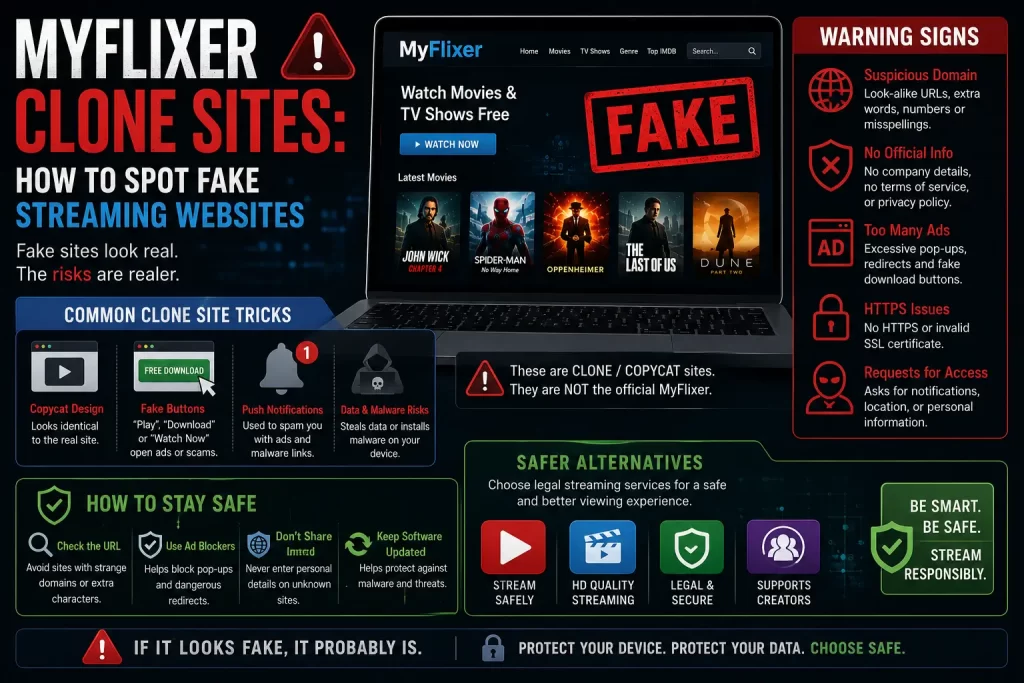

MyFlixer clone sites are fake, copied, or lookalike websites that use the MyFlixer name to attract people searching for free movies and TV shows. Some may look like a streaming site. Some may claim to be the “new” or “official” MyFlixer. Others may push APK downloads, pop-ups, fake play buttons, or payment forms.
The main problem is simple: users often cannot verify who is running these pages. A page may use the MyFlixer name, but that does not mean it is safe, legal, official, or trustworthy.
This guide explains how MyFlixer clone sites work, why they are risky, how to spot red flags, and what safer legal options users can choose instead.
Important note: This article is for educational purposes only. It does not provide MyFlixer mirror links, proxy links, working domains, bypass steps, APK downloads, or instructions for accessing unauthorized streaming services.
Quick Answer: Are MyFlixer Clone Sites Safe?
No. MyFlixer clone sites should be treated as risky. A clone site can copy the MyFlixer name, layout, colors, or wording, but that does not prove it is real, safe, or legal.
MyFlixer has appeared in anti-piracy reporting. The Guardian reported in 2024 that FMovies and affiliated sites, including MyFlixer, were shut down after action involving ACE and Hanoi police. The Intellectual Property Office of the Philippines also said it recommended blocking MyFlixer-related piracy domains in 2024.
Safety concerns are also important. Malwarebytes has a threat alert for a MyFlixer-related domain and says it was associated with riskware and abused to spread scams, phishing, potentially unwanted programs, and malware.
The safest advice is to avoid MyFlixer clone sites, mirrors, proxies, APK downloads, and fake “official” pages. Use legal streaming platforms or legal discovery tools instead.
Related guide: What Is MyFlixer? Safety, Legality, Risks, and Legal Alternatives Explained
What Are MyFlixer Clone Sites?
MyFlixer clone sites are websites that use the MyFlixer name or a similar name to attract users. They may look like movie streaming websites, but they may not be connected to any original service.
A clone site may use wording such as:
- Official MyFlixer
- New MyFlixer
- MyFlixer mirror
- MyFlixer proxy
- MyFlixer unblocked
- MyFlixer new domain
- MyFlixer app download
- MyFlixer APK
- MyFlixer premium
These phrases can make a page look useful, but they are also common in risky search results. A claim is not proof. Users should not trust a site only because it uses the MyFlixer name.
Why Do MyFlixer Clone Sites Exist?
Clone sites exist because MyFlixer receives search interest. When people search for a popular streaming name, fake pages can use that demand to get traffic.
Some clone sites may be built to show ads. Others may redirect users to another page. Some may push app downloads, collect emails, steal passwords, or sell fake premium access.
Clone sites often appear when users are looking for:
- A working MyFlixer site
- A new MyFlixer domain
- A MyFlixer mirror
- A MyFlixer proxy
- A MyFlixer app
- A MyFlixer APK
- A replacement after MyFlixer is down
This is why “MyFlixer not working” searches can lead users into risky pages. The safer response is not to search for another domain. It is to move to legal streaming options.
Related guide: Why Is MyFlixer Not Working? Shutdowns, Blocks, Errors, and Safe Next Steps
Why Clone Sites Are Risky
Clone sites are risky because users usually do not know who owns them, what they collect, what ads they run, or where buttons and redirects will lead.
Main risks include:
- Malware or riskware
- Fake play buttons
- Pop-ups and redirects
- Browser notification spam
- Phishing pages
- Password theft
- Fake app downloads
- Unsafe APK files
- Fake payment forms
- Privacy tracking
- Copyright risk
A clone site can look clean and still be unsafe. Design quality is not a trust signal by itself.
Red Flags of a Fake MyFlixer Site
Watch for these warning signs before trusting any MyFlixer-related page:
- It claims to be official but gives no proof.
- It uses “new domain,” “mirror,” “proxy,” or “unblocked” wording.
- It opens many pop-ups after one click.
- It shows several fake play buttons.
- It asks you to allow browser notifications.
- It asks you to download an APK or video player.
- It asks for card details for free verification.
- It redirects to unrelated websites.
- It has no clear company information.
- It has no clear privacy policy or support page.
- It promises every new movie or show for free.
- It asks you to disable security settings.
One red flag is enough to be careful. Several red flags together are a strong reason to leave the site.
Be Careful With “Official MyFlixer” Claims
Many clone pages use the word “official” to build trust. This is not reliable.
A real official service should clearly show who owns it, how it licenses content, where its official apps are, how users can contact support, and how payment or account data is protected.
Be cautious if a page only says it is official but does not provide clear details. Also be cautious if the page uses pressure language such as “access now,” “limited domain,” “verify now,” or “unlock free streaming.”
For a piracy-associated name like MyFlixer, the word “official” should not be treated as proof of safety.
MyFlixer Mirror and Proxy Risks
Users often search for MyFlixer mirrors or proxies when the site is down or blocked. This is risky.
A mirror or proxy page may be run by an unknown person. It may copy the look of a streaming site, but it can still push ads, redirects, fake downloads, or phishing forms.
Mirror and proxy risks include:
- Fake pages pretending to be real
- Malware and unwanted downloads
- Phishing login forms
- Fake premium access pages
- Browser notification spam
- Privacy tracking
- Copyright uncertainty
A mirror or proxy is not a safe alternative. It is better to use licensed platforms.
Phishing and Login Risks
Some fake MyFlixer pages may ask users to log in, create an account, verify access, or reset a password. This can be a phishing risk.
Phishing pages may collect:
- Email addresses
- Passwords
- Phone numbers
- Verification codes
- Payment details
- Account recovery information
Do not reuse important passwords on unclear streaming websites. If you used the same password on a MyFlixer-related page and another important account, change that password immediately.
Fake Premium or Payment Pages
Some clone sites may ask users to pay for premium access, ad-free viewing, faster servers, or account verification. This is risky if the site does not clearly show a verified company, refund policy, and legal content rights.
Payment risks include:
- Card details going to an unknown operator
- Recurring charges that are hard to cancel
- No clear refund process
- Fake support pages
- Unclear billing names
- Payment forms on clone sites
- Crypto payments that cannot be reversed
Paying a website does not prove that it has licensed rights to stream movies or TV shows.
APK and App Download Risks
Clone sites may push MyFlixer app downloads or APK files. Users should avoid these downloads.
Unknown APK files can contain malware, adware, spyware, or unwanted behavior. They may also ask for permissions that are not needed for a movie app.
Be careful if an app asks for access to:
- Contacts
- SMS messages
- Files and photos
- Location
- Camera
- Microphone
- Accessibility settings
- Install unknown apps permission
Use official apps from licensed streaming platforms instead of APKs from clone sites.
Related guide: Is There a MyFlixer App? App-Store Listings, APK Risks, and Safer Options
Privacy and Tracking Risks
Clone sites may collect user data through ads, cookies, forms, redirects, and scripts. Users may not know who receives this data or how long it is stored.
Possible privacy risks include:
- IP address tracking
- Browser fingerprinting
- Third-party ad tracking
- Email collection
- Device information collection
- Watch activity tracking
- No clear data deletion option
Legal platforms may also collect data, but they usually provide privacy policies, account controls, and support channels. Clone sites often provide much less transparency.
Related guide: Is MyFlixer Safe? Malware, Fake Sites, Ads, and Privacy Risks Explained
Legal and Copyright Concerns
MyFlixer clone sites may also create copyright risk if they provide access to unauthorized movies or TV shows.
MyFlixer has appeared in anti-piracy reporting. The Guardian reported that MyFlixer was among affiliated sites closed in the 2024 FMovies shutdown. IPOPHL also said it requested blocking of MyFlixer-related sites after finding piracy activity.
Copyright laws vary by country, and this article is not legal advice. The safest general choice is to avoid unauthorized streaming pages and use licensed platforms.
Related guide: Is MyFlixer Legal? Copyright Issues and Streaming Risks Explained
Simple Safety Checklist
Before trusting any streaming website, ask these questions:
- Who owns this site?
- Does it clearly explain its content rights?
- Does it have official apps from verified stores?
- Does it avoid pop-ups and redirects?
- Does it avoid APK downloads?
- Does it avoid card verification for free access?
- Does it have clear privacy and support pages?
- Does it avoid mirror or proxy language?
If the answer is unclear, leave the site.
What to Do If You Used a Fake MyFlixer Site
If you already used a suspicious MyFlixer clone site, take these steps:
- Close the page. Stop clicking pop-ups or redirects.
- Remove browser notifications. Delete unknown sites from notification settings.
- Remove unknown extensions. Check your browser add-ons.
- Uninstall suspicious apps. Remove any APK or app you do not trust.
- Run a malware scan. Use a trusted security tool.
- Change reused passwords. Start with email, banking, social, and work accounts.
- Enable two-factor authentication. Protect important accounts.
- Monitor payment accounts. Contact your bank if you entered card details.
Act quickly if you entered payment or login details on a page you no longer trust.
Safer Legal Options
The safest alternative to a MyFlixer clone site is not another clone. Use legal streaming platforms, rental services, official broadcaster apps, free legal ad-supported platforms, or legal discovery tools.
Safer options include:
- Netflix
- Prime Video
- Disney+
- Apple TV
- Hulu
- Max
- Paramount+
- Peacock
- Tubi
- Pluto TV
- Plex
- Official broadcaster apps
- Digital rental platforms
- Legal discovery tools such as JustWatch
Related guide: Best Legal MyFlixer Alternatives for Movies and TV Shows
Clone Sites vs Legal Streaming Platforms
| Factor | MyFlixer Clone Sites | Legal Streaming Platforms |
|---|---|---|
| Ownership | Often unclear | Verified company or provider |
| Content rights | Unclear or questionable | Licensed content agreements |
| Malware risk | Higher because of pop-ups, redirects, and downloads | Lower when using official apps and websites |
| App safety | May involve unknown APKs | Official app-store listings |
| Payment safety | Risky if payment pages are unclear | Standard billing and support |
| Privacy | Often unclear | Published privacy policies and settings |
| Reliability | Can disappear, redirect, or change domains | More stable and supported |
Final Verdict
MyFlixer clone sites should be avoided. They may look like streaming pages, but they can expose users to malware, fake buttons, redirects, phishing, unsafe APK downloads, privacy tracking, payment scams, and copyright concerns.
The safest choice is simple: do not search for MyFlixer mirrors, proxies, or new domains. Use legal streaming services and legal discovery tools instead.
FAQs About MyFlixer Clone Sites
What are MyFlixer clone sites?
MyFlixer clone sites are fake, copied, or lookalike websites that use the MyFlixer name to attract users searching for free movies and TV shows.
Are MyFlixer clone sites safe?
No. MyFlixer clone sites can expose users to pop-ups, redirects, malware risk, phishing pages, fake payment forms, unsafe APK downloads, and privacy tracking.
How can I spot a fake MyFlixer site?
Look for red flags such as mirror or proxy wording, fake play buttons, APK downloads, notification requests, card verification, unclear ownership, and many pop-ups.
Is an “official MyFlixer” page safe?
Not automatically. A page claiming to be official still needs clear ownership, support, privacy details, and legal content rights. A claim alone is not proof.
Are MyFlixer mirrors safe?
No. Mirror pages can be fake, unsafe, or unrelated. They may push ads, redirects, phishing forms, or downloads.
Are MyFlixer proxies safe?
No. Proxy pages are not safe legal alternatives. They can create security, privacy, and copyright risks.
Can fake MyFlixer sites steal passwords?
Yes. Fake login or verification pages can collect emails and passwords. Users should never reuse important passwords on unclear streaming pages.
Can fake MyFlixer sites steal payment details?
Yes. Fake premium or verification pages can collect card details or create recurring charges. Avoid payment pages with unclear ownership.
What should I do if I used a fake MyFlixer site?
Remove browser permissions, uninstall unknown apps or extensions, run a malware scan, change reused passwords, enable two-factor authentication, and monitor payment accounts.
What should I use instead of MyFlixer clone sites?
Use legal streaming platforms, official broadcaster apps, rental services, free legal ad-supported platforms, or legal discovery tools such as JustWatch.
Sources and Further Reading
Disclaimer
This article is for general educational and informational purposes only. It does not provide legal advice, cybersecurity advice, financial advice, working domains, mirror links, proxy links, APK downloads, or instructions for accessing unauthorized streaming services. Site availability, app listings, safety signals, and streaming catalogues can change over time. Users should rely on licensed streaming platforms, official app stores, banks, cybersecurity professionals, and legal sources whenever possible.