
Many users search for “BollyFlix not working” when a BollyFlix-related page does not open, a movie download button fails, a video does not load, a domain redirects somewhere else, or a browser shows a warning.
The important thing to understand is that BollyFlix-style sites are often connected with unauthorized movie downloads and piracy-related search intent. Because of that, these sites may stop working for many reasons, including blocking, domain removal, server issues, clone-site confusion, broken download links, browser security warnings, or unsafe redirects.
This guide explains why BollyFlix may not be working and what users should do safely. It does not help users find mirrors, proxies, Telegram channels, APKs, new domains, or bypass methods. Instead, it explains the risks and points users toward legal alternatives for Bollywood, South Indian, Hindi dubbed, regional, and Indian web-series content.
Important note: This article is for educational purposes only. It does not provide BollyFlix working links, mirror links, proxy links, Telegram channel names, APK downloads, movie download instructions, or bypass steps.
Quick Answer: Why Is BollyFlix Not Working?
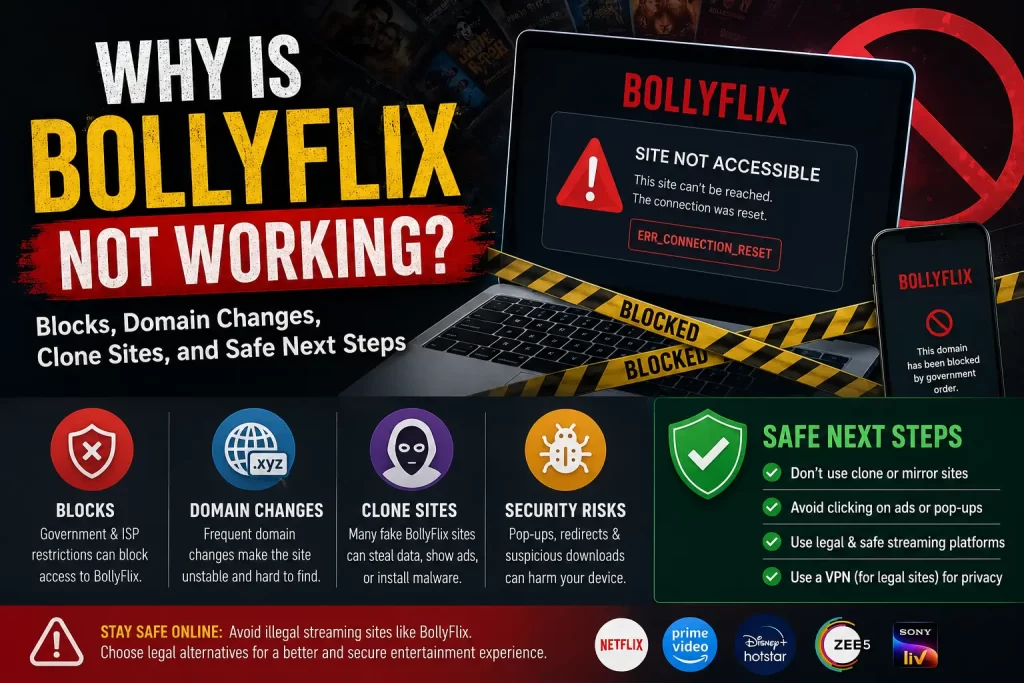
BollyFlix may not be working because the domain is blocked, removed, redirected, copied by clone sites, affected by server issues, flagged by security tools, or connected to broken download links.
In some cases, a BollyFlix-related page may stop opening because of copyright enforcement or ISP-level blocking. In other cases, users may land on fake pages that claim to be the “new” or “official” BollyFlix domain.
India has strengthened anti-piracy rules. The Press Information Bureau explains that the Cinematograph Act prohibits unauthorized recording and transmission of films and provides penalties for violations. A Department of Telecommunications document related to a Delhi High Court matter also instructed internet service licensees to block access to listed websites, including a BollyFlix-related domain.
The safest response is not to search for mirrors, proxies, APKs, or Telegram links. Use legal streaming platforms, official apps, rental platforms, or legal discovery tools instead.
Related guide: What Is BollyFlix? Safety, Legality, Download Risks, and Legal Alternatives Explained
Common Reasons BollyFlix May Not Open
There is no single reason why a BollyFlix-related page may stop working. The issue may come from the website, the user’s network, the browser, security tools, or legal enforcement.
Common reasons include:
- The domain has been blocked
- The domain has expired or changed
- The site has server problems
- The page is overloaded with ads or redirects
- The download links are broken
- The video host has removed the file
- The page is a clone or fake version
- The browser is blocking unsafe content
- Antivirus or security software is warning the user
- The user is being redirected to an unrelated page
- A link shortener or Telegram link no longer works
Any of these issues can make a BollyFlix-style page look down or broken.
Blocking and Legal Enforcement
One reason BollyFlix may not be working is blocking or legal enforcement.
Piracy-related domains can be blocked through court orders, government directions, ISP action, or rights-holder complaints. When this happens, users may see a blank page, network error, DNS error, access-denied message, or browser warning.
A Department of Telecommunications document connected to a Delhi High Court matter instructed internet service licensees to take action to block listed websites. The document includes a BollyFlix-related domain in the listed websites. This helps explain why some BollyFlix-related pages may stop opening for users in India.
Users should not try to bypass blocks. Blocking is often connected to copyright enforcement, and bypassing blocked piracy sites can create legal and security risk.
Related guide: Is BollyFlix Legal? Copyright Issues, Movie Piracy, and India-Specific Risks
Domain Changes and Redirects
BollyFlix-style sites may change domains often. A domain change can happen because a site is blocked, removed, reported, expired, copied, or abandoned.
Users may then see pages claiming to be:
- New BollyFlix domain
- Official BollyFlix site
- BollyFlix latest link
- BollyFlix working link
- BollyFlix proxy
- BollyFlix mirror
- BollyFlix new APK
These claims are risky. A page that says it is the latest domain may be a clone, scam page, ad trap, or malware page.
Clone Sites and Fake “New Domain” Pages
Clone sites are a major reason users get confused when BollyFlix is not working. A clone page may copy the name, layout, movie categories, file-quality labels, or download language of a familiar site.
Fake pages may try to:
- Capture search traffic
- Show aggressive ads
- Push fake download buttons
- Redirect users to APK pages
- Collect email addresses or passwords
- Send users to Telegram channels
- Promote fake premium access
- Collect payment details
Do not trust a page simply because it uses the BollyFlix name. The safer approach is to leave and use legal platforms.
Related guide: BollyFlix Clone Sites: How to Spot Fake Movie Download Websites
Browser and Antivirus Warnings
Sometimes BollyFlix may not work because a browser, antivirus program, DNS filter, or security tool blocks the page.
Security warnings may appear when a page is linked to:
- Malware risk
- Phishing risk
- Suspicious redirects
- Unsafe downloads
- Unwanted software
- Deceptive ads
- Risky browser notifications
Do not ignore security warnings. If your browser or antivirus blocks a BollyFlix-related page, treat that as a safety signal.
Related guide: Is BollyFlix Safe? Malware, Pop-Ups, Fake Downloads, and Privacy Risks Explained
Why BollyFlix Downloads May Not Work
Download errors are common on movie piracy-style pages. A download button may be fake, expired, broken, overloaded, or connected to a removed file.
Common download issues include:
- Download button opens an ad
- Link shortener does not load
- File host removed the file
- Download starts but stops halfway
- File asks for a password
- File opens as an APK or installer
- Download redirects to another site
- Browser blocks the file as unsafe
If a download does not work, do not keep clicking new buttons. That can increase the chance of malware, redirects, or scams.
Related guide: BollyFlix Download Risks: 300MB Movies, APKs, Fake Files, and Safer Options
Why Videos May Not Load
Some users search for BollyFlix not working because a video player does not load. This can happen for several reasons.
Possible causes include:
- The video host removed the file
- The player is broken
- The page uses unsafe scripts blocked by the browser
- The page is overloaded with ads
- The site is redirecting users away from the video
- The content was never actually hosted there
- The page is a fake clone created for ad clicks
Do not install a special player, codec, extension, or APK to “fix” the video. These prompts are common malware and adware risks.
Server Errors, DNS Errors, and Loading Problems
Users may see technical errors when a BollyFlix-related page is down or blocked.
Examples include:
- Site cannot be reached
- DNS error
- Server not found
- Connection timed out
- Too many redirects
- Blank page
- Access denied
- SSL or certificate warning
These errors may come from server issues, blocking, domain changes, unsafe redirects, or clone-site problems. They are not a reason to search for risky mirrors or proxy links.
BollyFlix App and APK Confusion
Some users search for an app when the website is not working. This can create more risk.
A Google Play listing using the BollyFlix name describes itself as a Bollywood movie guide and says it does not stream or host movies. It provides information such as trailers, cast details, ratings, and where to watch legally. That means app-store listings using the name may not be streaming apps.
Users should also avoid third-party BollyFlix APK downloads. Unknown APKs can expose users to malware, adware, spyware, unwanted permissions, and fake streaming features.
Related guide: Is There a BollyFlix App? App-Store Listings, APK Risks, and Safer Legal Apps
Telegram and Link-Sharing Problems
Some piracy ecosystems use Telegram channels, file-sharing pages, and link shorteners. If a BollyFlix-related page is not working, users may be pushed toward Telegram links or file-sharing groups.
This is risky because Telegram-style links may involve:
- Unauthorized movie files
- Fake files
- Malware links
- Impersonation channels
- Scam groups
- APK redirects
- Phishing forms
- Copyright risk
Do not follow Telegram links that offer pirated movies, new releases, or unauthorized downloads.
Related guide: BollyFlix Telegram Risks: Movie Piracy Channels, Fake Links, and Malware Concerns
What Not to Do
If BollyFlix is not working, avoid unsafe fixes.
- Do not search for mirror links
- Do not use proxy sites
- Do not download APK files from unknown websites
- Do not join Telegram piracy channels
- Do not install browser extensions from movie pages
- Do not allow notifications from unknown sites
- Do not enter payment details for “free access”
- Do not ignore browser or antivirus warnings
- Do not keep clicking fake download buttons
Trying to “fix” a blocked or broken piracy-style page often creates more risk than the original problem.
Safe Steps to Take Instead
Instead of trying to find another BollyFlix domain, take safer steps.
- Close the page. Stop clicking ads, pop-ups, or download buttons.
- Check whether your browser warned you. Treat warnings seriously.
- Remove unknown notification permissions. Block suspicious sites from sending notifications.
- Do not install APKs or extensions. Avoid third-party downloads.
- Use legal discovery tools. Search where the movie is available legally.
- Choose a legal platform. Use official apps, rentals, or licensed streaming services.
What If You Already Clicked a Suspicious Link?
If you clicked a suspicious BollyFlix-related link, take basic safety steps.
- Do not open unknown files. Delete suspicious downloads.
- Remove browser notification permissions. Block unknown sites.
- Check extensions. Remove anything unfamiliar.
- Uninstall unknown apps or APKs. Remove anything you installed from a third-party page.
- Run a malware scan. Use a trusted security tool.
- Change reused passwords. Start with email, banking, work, and social accounts.
- Monitor payment accounts. Contact your bank if you entered card details.
Legal Alternatives When BollyFlix Is Down
The safest alternative is to use legal platforms that provide Bollywood, South Indian, Hindi dubbed, regional, and Indian web-series content.
Legal options may include:
- Netflix
- Prime Video
- Disney+ Hotstar
- JioCinema
- ZEE5
- SonyLIV
- Apple TV
- YouTube Movies
- Google TV
- Official broadcaster apps
- Regional streaming platforms where available
- Legal discovery tools such as JustWatch
JustWatch helps users find where movies and shows are legally available across services. You can visit it here: JustWatch.
Related guide: Best Legal BollyFlix Alternatives for Bollywood, South Indian, and Hindi Dubbed Movies
Unsafe Fixes vs Safe Alternatives
This table explains safer choices when BollyFlix is not working.
| Problem | Unsafe Response | Safer Response |
|---|---|---|
| Site will not open | Search for mirror or proxy links | Use a legal platform or discovery tool |
| Download button fails | Click more ads or short links | Do not download from unknown pages |
| Video does not load | Install a special player or extension | Use official streaming apps |
| Domain redirects | Trust the new page automatically | Assume clone-site risk and leave |
| Browser warning appears | Bypass the warning | Close the page |
| App is promoted | Download a third-party APK | Use official legal apps |
Final Verdict
BollyFlix may stop working because of blocking, domain changes, clone-site confusion, broken download links, server errors, browser warnings, or unsafe redirects.
The safest response is not to look for a new BollyFlix link, mirror, proxy, APK, or Telegram channel. Those paths can increase malware, privacy, and copyright risk.
Use legal streaming platforms, official broadcaster apps, rental platforms, and legal discovery tools instead.
FAQs About BollyFlix Not Working
Why is BollyFlix not working?
BollyFlix may not work because of blocking, domain changes, server issues, broken links, browser warnings, clone-site confusion, or unsafe redirects.
Is BollyFlix down?
It may be down, blocked, redirected, or copied by clone sites. Users should not search for mirror or proxy links.
Why is BollyFlix not opening in India?
Some piracy-related domains can be blocked through court or government-linked enforcement action. Users should use legal platforms instead of bypass methods.
Why are BollyFlix downloads not working?
Download buttons may be fake, expired, broken, redirected, blocked by the browser, or linked to removed files.
Should I use a BollyFlix proxy?
No. Proxy and mirror pages can expose users to malware, phishing, clone sites, privacy tracking, and copyright risk.
Should I download a BollyFlix APK if the site is not working?
No. Unknown APK downloads can expose users to malware, adware, spyware, unwanted permissions, and fake streaming features.
What should I use instead?
Use legal platforms such as Netflix, Prime Video, Disney+ Hotstar, JioCinema, ZEE5, SonyLIV, Apple TV, YouTube Movies, Google TV, official broadcaster apps, or JustWatch.
Sources and Further Reading
Disclaimer
This article is for general educational and informational purposes only. It does not provide legal advice, cybersecurity advice, financial advice, working links, download links, APK links, mirror links, proxy links, Telegram channel names, or instructions for accessing unauthorized streaming or download services. Users should rely on licensed streaming platforms, official app stores, cybersecurity professionals, and qualified legal sources whenever possible.