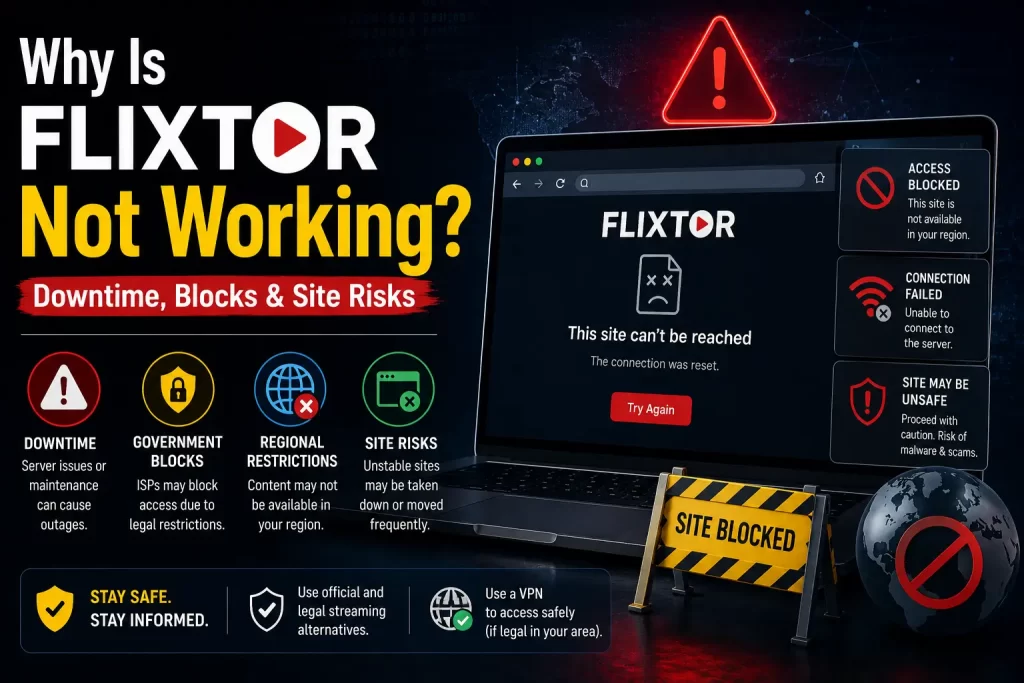

Many users search “Flixtor not working” when a Flixtor-related site will not load, videos will not play, a page redirects somewhere unexpected, or a familiar domain appears to be unavailable. But the answer is rarely simple.
Flixtor-style sites can stop working for many reasons, including downtime, domain changes, hosting issues, anti-piracy pressure, regional blocking, browser warnings, clone-site confusion, app confusion, or fake pages pretending to be the real service.
This guide explains the main reasons Flixtor may not work, why users should avoid mirror and proxy searches, how clone sites create extra risk, and what safer legal alternatives users can choose instead.
Important note: This article is for educational purposes only. It does not provide Flixtor mirror links, proxy links, bypass instructions, APK downloads, or access methods for unauthorized streaming services.
Quick Answer: Why Is Flixtor Not Working?
Flixtor may not be working because of downtime, domain changes, server issues, anti-piracy enforcement pressure, regional blocking, fake clone pages, browser security warnings, app confusion, or unstable third-party video sources.
Flixtor has had public downtime before. In 2018, TorrentFreak reported that Flixtor became unavailable and later displayed a notice saying the operators were writing fresh video software, setting up new hardware, and rebuilding the video library. You can read that report here: Flixtor Promises to Return More Resilient and Better Than Ever.
Flixtor has also appeared in anti-piracy reporting. In 2023, TorrentFreak reported that Dutch anti-piracy group BREIN pursued a dynamic injunction against Lookmovie and Flixtor, with concerns around domain switching and proxy or mirror-site countermeasures. You can read more here: Lookmovie and Flixtor Blocking Action.
The safest recommendation is simple: if Flixtor is not working, do not search for mirrors, proxies, APKs, or replacement domains. Use legal streaming platforms or legal discovery tools instead.
Related guide: What Is Flixtor? Safety, Legality, Risks, and Legal Alternatives Explained
Common Reasons Flixtor May Not Be Working
There are many possible reasons a Flixtor-related page may stop working. Some are technical, some are legal, and some are related to copycat sites or fake pages.
Common reasons include:
- Temporary server downtime
- Domain changes
- Hosting issues
- DNS problems
- Regional site blocking
- Anti-piracy pressure
- Browser security warnings
- Broken video sources
- Fake clone pages
- Search-result confusion
- App-store confusion
- Third-party redirect problems
- Pop-up or ad-network failures
- Removed content libraries
- Changes in streaming infrastructure
Because Flixtor-style services do not operate like normal licensed platforms, users often cannot easily verify the exact reason for an outage.
Flixtor Downtime and Past Rebuilding Issues
Flixtor has experienced public downtime before. In late 2018, TorrentFreak reported that the service went down and later showed a message saying it was rebuilding its complete video library, writing new video software, and setting up new hardware.
That report also noted user concern around VIP accounts and compensation because some users had paid for premium-style access. This is important because it shows that downtime can affect not only viewing access, but also users who shared account or payment information.
Past downtime does not prove the reason for every later outage, but it does show a pattern of instability. A licensed streaming provider may also experience downtime, but it normally has customer support, status pages, verified apps, billing support, and official communication channels. Flixtor-style services usually do not provide the same level of transparency.
Related guide: Flixtor VIP: Payment, Account, and Privacy Risks Users Should Know
Domain Changes and Website Instability
Unauthorized streaming services often become unstable because domains can be blocked, seized, abandoned, redirected, copied, or replaced. Users may search for a familiar name and find many different pages claiming to be the new or official version.
Domain instability can happen when:
- A domain stops resolving
- A host removes service
- A domain registrar takes action
- A site changes nameservers
- A page redirects to another domain
- Search results show old or fake domains
- Copycat pages capture traffic after an outage
- Anti-piracy groups target related domains
This is one reason users should avoid searching for “new Flixtor domain,” “working Flixtor,” or similar phrases. Such searches can lead to clone sites, phishing pages, aggressive ads, or malware risks.
Site Blocking and Anti-Piracy Actions
Flixtor may not work in some locations because of site-blocking efforts or legal pressure. Site blocking is a tool used in some countries to reduce access to unauthorized streaming or piracy-related websites.
In 2023, TorrentFreak reported that BREIN pursued legal action in the Netherlands against Lookmovie and Flixtor through the Court of Rotterdam. The case focused on blocking access while reducing the effect of domain switching and proxy or mirror-site countermeasures.
Flixtor has also appeared in DMCA subpoena reporting. In 2022, the Alliance for Creativity and Entertainment obtained subpoenas targeting several high-profile piracy sites, including Flixtor. The subpoenas sought information from online intermediaries connected to those services. You can read the report here: ACE Takes Aim at Flixtor and Other Piracy Targets.
These actions do not mean that every user sees the same error or block. Site availability can differ by country, internet provider, domain, browser, and network.
Related guide: Is Flixtor Legal? Copyright Issues and Streaming Risks Explained
Clone Sites and Fake “New Flixtor” Pages
When users search “Flixtor not working,” they may find pages claiming to be the new Flixtor, official Flixtor, updated Flixtor, or a working replacement. These claims should be treated with caution.
Clone sites may appear after downtime, blocks, or domain changes. They may use similar names, similar layouts, similar logos, or phrases designed to make users believe they found the real service.
Clone sites may be created to:
- Capture search traffic from users looking for Flixtor
- Show aggressive ads
- Redirect users to unrelated streaming pages
- Push suspicious apps or browser extensions
- Collect email addresses or passwords
- Sell fake VIP access
- Collect payment information
- Trick users into allowing browser notifications
- Promote APK downloads
- Rank for “Flixtor not working” and similar keywords
In 2018, reporting noted that Flixtor’s operators warned users about impostor sites during a major outage. That is a clear example of why clone-site risk matters.
Related guide: Flixtor Clone Sites: How to Spot Fake Streaming Websites
Why Flixtor May Not Load in Your Browser
A Flixtor-related page may fail to load for several browser or network reasons. These can include technical issues, security warnings, regional blocks, or site-side problems.
Possible causes include:
- The domain no longer exists
- The site is temporarily offline
- The domain is blocked by an internet provider
- The domain is blocked by a country-level or court-ordered measure
- The browser blocks the page because of security risks
- The device security software blocks the page
- The DNS resolver cannot reach the domain
- The site redirects incorrectly
- The page is a fake clone that has been removed
- The site is overloaded or misconfigured
Users should not respond to loading errors by searching for proxies or mirrors. Those searches often lead to unsafe pages.
Why Flixtor Videos May Not Play
Sometimes a Flixtor-related site loads, but videos do not play. That can happen for several reasons.
- The video source may be broken
- The third-party host may have removed the file
- The player may be blocked by the browser
- The site may rely on unstable third-party sources
- The page may be a fake clone with non-working players
- Ads or scripts may interfere with playback
- The browser may block mixed content or unsafe scripts
- The content library may have been rebuilt, removed, or changed
- The site may intentionally show fake play buttons to trigger redirects
A broken video player is not just a technical issue. On risky streaming sites, fake players and fake play buttons can be used to push redirects, ads, downloads, or notification permissions.
Redirects, Pop-Ups, and Fake Play Buttons
If a Flixtor-related page opens pop-ups, redirects to unrelated sites, or shows several play buttons, users should stop interacting with the page.
Unsafe streaming pages may use:
- Fake “play” buttons
- Fake “download” buttons
- Fake “continue watching” buttons
- Fake CAPTCHA prompts
- Browser notification prompts
- Fake video-player updates
- Fake antivirus warnings
- Redirects to unrelated sites
- Pop-ups promoting apps or extensions
- Payment pages for fake verification
The U.S. Federal Trade Commission has warned that illegal streaming apps and websites can expose users to malware and data theft. You can read the FTC warning here: Malware from illegal video streaming apps.
Related guide: Is Flixtor Safe? Malware, Fake Sites, Ads, and Privacy Risks Explained
Flixtor App Confusion and App-Store Listings
Some users search “Flixtor not working” because they expect an app to work like a streaming platform. But app-store listings using the Flixtor name may not be actual streaming apps.
One Apple App Store listing using the Flixtor name says the app is not for streaming or watching movies and only helps users find movies and TV shows. You can view that listing here: Flixtor Movie, TV Show & Series on the Apple App Store.
A Google Play listing for “Flixtor TV” says the app does not host or stream copyrighted content and is designed for browsing and discovering entertainment content. You can view that listing here: Flixtor TV on Google Play.
This means an app using the Flixtor name may not be broken. It may simply not be designed to stream movies in the first place. Users should read app descriptions carefully and avoid unofficial APK downloads.
Related guide: Is There a Flixtor App? What to Know Before Downloading Anything
Is Flixtor Blocked in My Country?
Flixtor availability can vary by region. A site may be unreachable in one country, accessible in another, blocked by one internet provider, or unavailable because the domain itself is down.
Possible blocking-related reasons include:
- Court-ordered site blocking
- ISP-level blocking
- DNS filtering
- Security software blocking
- Regional anti-piracy enforcement
- Domain-level action
- Hosting-provider action
This article does not provide instructions to bypass blocks. If a site is blocked or unavailable, users should move to legal streaming alternatives rather than searching for mirrors or proxies.
Why You Should Avoid Flixtor Mirrors and Proxies
When Flixtor is not working, many users search for mirror or proxy pages. This is one of the riskiest things to do.
Mirrors and proxies can create several problems:
- They may be clone sites pretending to be official
- They may show aggressive or malicious ads
- They may collect login details
- They may sell fake VIP access
- They may redirect users to unsafe pages
- They may push APK downloads
- They may expose users to malware
- They may create additional copyright risk
- They may disappear without warning
- They may be used to capture users during outages
The safer recommendation is to avoid mirrors and proxies completely.
What Not to Do When Flixtor Is Down
If a Flixtor-related page is not working, avoid these actions:
- Do not search for working Flixtor mirrors
- Do not use proxy pages
- Do not download Flixtor APK files
- Do not install browser extensions to “unlock” streaming
- Do not enter card details for free verification
- Do not allow browser notifications from unknown streaming sites
- Do not sign in with reused passwords
- Do not trust pages claiming to be the only official replacement
- Do not ignore browser or antivirus warnings
- Do not use unauthorized streams for public or commercial viewing
These actions can create malware, privacy, payment, and legal risks.
Safe Steps to Take Instead
If Flixtor is not working and you were trying to watch a specific movie or TV show, follow a safer workflow.
- Search the title on a legal discovery tool. Use a service such as JustWatch to find legal availability by country.
- Check your current subscriptions. The title may already be included in a platform you use.
- Check rental and purchase options. Renting one title can be safer than using a risky site.
- Check free legal services. Look for ad-supported legal services and broadcaster apps in your region.
- Use official apps only. Download apps from verified app stores or official platform websites.
- Avoid suspicious pages. Do not use mirrors, proxies, clone domains, or APK sites.
- Protect your accounts. Do not reuse passwords on streaming pages with unclear ownership.
JustWatch is useful because it helps users find where movies, TV shows, and sports are legally available across streaming services. You can visit it here: JustWatch.
Legal Alternatives When Flixtor Is Not Working
The best alternative to a non-working Flixtor page is not another unauthorized streaming page. The best alternative is a legal service or legal discovery tool.
Legal options may include:
- Paid streaming services such as Netflix, Prime Video, Disney+, Apple TV, Hulu, Max, Paramount+, Peacock, and regional platforms
- Free ad-supported legal services such as Tubi, Pluto TV, Plex, and broadcaster-owned services where available
- Digital rental and purchase platforms such as YouTube Movies, Google TV, Apple TV, and Prime Video rentals
- Official broadcaster apps and network apps
- Library-linked streaming services where available
- Legal discovery tools such as JustWatch
Availability changes by country, so users should check services available in their region.
Related guide: Best Legal Flixtor Alternatives for Movies and TV Shows
Flixtor Not Working: Risk Comparison Table
This table explains the safer choice when Flixtor is not working.
| Option | What It Means | Risk Level | Recommended? |
|---|---|---|---|
| Searching for Flixtor mirrors | Looking for copied or replacement domains | High | No |
| Using Flixtor proxy pages | Trying to access blocked or unstable pages through intermediaries | High | No |
| Downloading Flixtor APKs | Installing apps from unknown third-party websites | High | No |
| Using a legal discovery tool | Finding where a title is legally available | Low | Yes |
| Using a paid streaming service | Watching licensed content through official platforms | Low | Yes |
| Using free legal streaming services | Watching licensed ad-supported content | Low | Yes |
| Renting or buying digitally | Paying for legal access to a specific title | Low | Yes |
Final Verdict
Flixtor may not work for many reasons, including downtime, domain changes, technical problems, blocking, anti-piracy pressure, fake clones, app confusion, or broken video sources.
The important point is what users do next. Searching for mirrors, proxies, APKs, or new domains can expose users to malware, phishing, privacy issues, payment scams, and copyright uncertainty.
The safer recommendation is clear: if Flixtor is not working, do not try to find another Flixtor access point. Use legal streaming services, free legal platforms, digital rental options, official broadcaster apps, or legal discovery tools instead.
FAQs About Flixtor Not Working
Why is Flixtor not working?
Flixtor may not be working because of downtime, domain changes, server issues, regional blocking, legal pressure, fake clone pages, app confusion, or broken video sources.
Is Flixtor down?
Flixtor-style sites can experience downtime or domain instability. Users should avoid searching for mirrors or proxies and use legal streaming alternatives instead.
Why is Flixtor not loading?
Flixtor may not load because the domain is unavailable, blocked, misconfigured, removed, or flagged by browser or security tools. It may also be a fake clone page.
Why are Flixtor videos not playing?
Videos may fail because of broken third-party sources, removed files, unsafe scripts, browser blocking, clone-site issues, or fake video players.
Is Flixtor blocked?
Flixtor may be blocked in some locations or by some internet providers. Site availability can vary by country, ISP, domain, and network.
Should I use a Flixtor mirror?
No. Flixtor mirrors can be risky because they may be clone sites, phishing pages, malware sources, or unauthorized streaming pages.
Should I use a Flixtor proxy?
No. Proxy pages are not safe legal alternatives and can expose users to privacy, security, and copyright risks.
Can I download a Flixtor APK if the site is not working?
No. Users should avoid Flixtor APK downloads from third-party websites because they can expose devices to malware, adware, spyware, and privacy risks.
What should I use instead of Flixtor?
Use legal streaming platforms, free ad-supported legal services, digital rental platforms, official broadcaster apps, or discovery tools such as JustWatch.
What is the safest thing to do when Flixtor is not working?
The safest thing to do is avoid mirrors, proxies, clone sites, and APKs. Search for the title on a legal discovery tool and use licensed streaming options.
Sources and Further Reading
- TorrentFreak: Flixtor Promises to Return More Resilient and Better Than Ever
- TorrentFreak: Lookmovie and Flixtor Blocking Action
- TorrentFreak: ACE Takes Aim at 9anime, Soap2day, Flixtor & Other High-Profile Piracy Targets
- Federal Trade Commission: Malware from Illegal Video Streaming Apps
- Apple App Store: Flixtor Movie, TV Show & Series
- Google Play: Flixtor TV
- JustWatch: Streaming Availability Search
Disclaimer
This article is for general educational and informational purposes only. It does not provide legal advice, cybersecurity advice, or instructions for accessing unauthorized streaming services. Site availability, app listings, legal actions, and streaming catalogues can change over time. Users should rely on licensed streaming platforms and official legal sources whenever possible.